SafeNet VPN
Private browsing, full support, and complete transparency. Your ISP sees encrypted traffic. Nothing else.
What SafeNet Is (and Isn't)
SafeNet is more than a VPN. It's private browsing + full support + real-time transparency for SecureNet customers with Protectli Vaults. Connect to a SafeNet network and all your traffic automatically routes through our Chicago server. No apps to install, no per-device configuration.
Important: SafeNet is exclusive to SecureNet configurations on Protectli hardware. It is not a standalone VPN service you can purchase separately.
What SafeNet Includes
Private Browsing VPN
Your ISP sees only encrypted WireGuard traffic. They cannot see what websites you visit, what you search for, or what you do online.
Full Support
Everything OSS touches is supported. SecureNet configuration, SafeNet connectivity, hardware issues. Open a ticket, get help.
Real-Time Dashboard
See server health, your connection status, and active metrics. Full transparency into the infrastructure protecting your privacy.
What SafeNet Is NOT For
Travel or Coffee Shops
SafeNet protects your home network only. When you're at Starbucks, your phone isn't tunneled through SafeNet (unless you use a separate mobile VPN).
Streaming Services
Netflix, Hulu, Disney+, and YouTube are blocked by design. Streaming services also actively block VPNs anyway.
Gaming or Torrenting
UDP traffic is blocked to manage bandwidth and protect the service. Use your regular network for gaming.
Support Included
SafeNet isn't just a VPN. It's your support subscription for your entire OSS system. As long as you're a SafeNet subscriber, you have full support for everything OSS touches.
What's Covered
SecureNet configuration issues, SafeNet VPN connectivity, OPNsense questions, hardware troubleshooting, WiFi access point issues, network segmentation questions, Monit alerts, and anything else related to your OSS system.
What's Not Covered
Third-party devices on your network (NAS, Ubiquiti switches, smart home hubs). If we trace an issue to third-party hardware, we'll let you know and point you in the right direction.
How It Works
Open a ticket through our support portal. Best effort response during business hours. No phone calls, but thorough written support with video guides for common issues.
Hardware Support Forever
Even without SafeNet, we support hardware issues indefinitely. Protectli backs the hardware with a 2-year warranty. We coordinate RMA if something fails.
Think of it like insurance: Even if you never open a ticket, you have support when you need it. Most SecureNet systems just run. But when something goes wrong, you're not on your own.
Support Tiers
| Customer Type | Support Level |
|---|---|
| SafeNet Subscriber | Full support for everything OSS touches. Troubleshooting, guidance, proactive monitoring (if opted in). |
| Non-Subscriber (after trial) | Hardware support only. We send you a troubleshooting guide. If it's confirmed hardware failure, we coordinate RMA with Protectli. |
| Out of Warranty (2+ years) | Best-effort guidance. Hardware replacement at customer expense. |
Proactive Support (Opt-In)
Most support is reactive. Something breaks, you open a ticket, someone eventually responds. SafeNet offers something different: we can reach out to you before you even notice a problem.
How Proactive Support Works
- 1. During onboarding, you choose whether to opt in
- 2. Your Vault's Monit monitoring system sends alerts to both you AND OSS
- 3. If we see something concerning (LAN port down, CPU pegged, disk filling up), we email you
- 4. You get a heads-up before a small issue becomes a big problem
CPU usage, RAM usage, disk space, LAN port status, swap memory, and critical services. If your LAN port goes down or your SSD starts filling up (maybe a runaway log file), you'll know about it.
What We Monitor vs. What We Ignore
| We Reach Out | Normal (We Ignore) |
|---|---|
| LAN port down or flapping | ISP going up and down (that's your ISP's problem) |
| CPU pegged at 100% sustained | Brief CPU spikes (normal operation) |
| Disk filling up (90%+) | Normal disk usage growth |
| RAM exhausted, using swap | Normal RAM usage patterns |
Not 24/7 Monitoring: Proactive support means we check alerts daily and reach out if something looks wrong. It's not a staffed NOC watching your network around the clock. That's on the roadmap for the future.
How It Works
SafeNet creates an encrypted tunnel between your Protectli Vault and our Chicago server. Traffic on SafeNet networks is automatically routed through this tunnel.
Websites see: Chicago IP address | Your ISP sees: Encrypted WireGuard packets
Using SafeNet is Simple
- 1. Connect to a SafeNet network (WiFi or plug into Port 3)
- 2. Check your IP at whatismyip.com (you should see a Chicago IP)
- 3. Browse privately (that's it, all traffic is now tunneled)
SafeNet networks use 10.x.x.x IP addresses (like 10.60.60.x). If your device has a 10.x.x.x IP, your traffic is being tunneled. If it has a 192.168.x.x IP, you're on a regular network.
Server Infrastructure
SafeNet runs on dedicated hardware in a professional datacenter, not shared cloud instances.
Chicago Server (Live)
| Component | Specification |
|---|---|
| CPU | Intel Xeon E3-1230 v6 (4 cores / 8 threads @ 3.5GHz) |
| RAM | 32GB DDR4 |
| Storage | 250GB SSD |
| Network | 10 Gbps dedicated fiber (unmetered) |
| Operating System | Ubuntu Server 24.04 LTS |
| Location | Chicago, USA |
Security Hardening
| Feature | Configuration |
|---|---|
| SSH Authentication | Key-only (passwords disabled) |
| Brute Force Protection | fail2ban (3 failures = 1 hour ban) |
| Firewall | UFW (essential ports only) |
| Auto-Patching | unattended-upgrades enabled |
| IPv6 | Disabled |
| And more... | See full configuration on GitHub → |
Future Expansion
Additional servers planned for New York City and Los Angeles as subscriber base grows. Same hardware specifications, same security hardening, more geographic options.
WireGuard Protocol
SafeNet uses WireGuard, a modern VPN protocol that's faster, simpler, and more secure than traditional options like OpenVPN.
Why WireGuard?
| Metric | OpenVPN | WireGuard |
|---|---|---|
| Code Size | ~100,000 lines | ~4,000 lines (easier to audit) |
| Throughput Overhead | 30-50% overhead | 5-15% overhead |
| CPU Overhead | High (userspace processing) | Low (in-kernel on OPNsense) |
| Configuration | 50+ lines, certificates | 10 lines, public/private keys |
| Connection Handling | Requires reconnect on IP change | Seamless roaming |
Encryption Stack
| Component | Algorithm |
|---|---|
| Encryption | ChaCha20 |
| Authentication | Poly1305 |
| Key Exchange | Curve25519 (ECDH) |
| Hashing | BLAKE2s |
Browse-Only Policy
SafeNet enforces a browse-only policy by design. This isn't a limitation. It's how we keep the service fast, legal, and affordable for everyone.
✓ Allowed
- • Web browsing (HTTP/HTTPS)
- • Email (IMAP, SMTP, POP3)
- • Mobile apps (most use TCP)
- • Embedded video in web pages
- • Standard TCP protocols
✗ Blocked
- • Streaming (Netflix, Hulu, Disney+, YouTube)
- • Torrenting / P2P
- • UDP gaming
- • VoIP / Video calls (Zoom, Teams, Discord)
- • FTP
Why These Restrictions?
| Reason | Explanation |
|---|---|
| Bandwidth Management | 200 customers sharing 10 Gbps requires control. One 4K stream is 25 Mbps. Multiply by many users and the server saturates. |
| Legal Protection | No torrenting means no piracy liability for OSS or our customers. |
| Server Cost Control | Streaming = massive bandwidth = higher costs = higher prices. Browse-only keeps SafeNet at $9/month. |
Note on VoIP: VoIP quality suffers through any VPN tunnel due to latency. Your other networks (Home, Smart, Guest) have unrestricted internet with QoS priority for voice traffic. Use those for video calls.
Enforcement Methods
- • Protocol blocking: UDP blocked (kills streaming, gaming, VoIP)
- • DNS filtering: Streaming CDNs return NXDOMAIN (netflix.com, disneyplus.com, etc.)
Privacy Architecture
Most VPNs ask you to trust them. We give you the tools to verify. Here's exactly what we log, what we don't, and what that means for your privacy.
What the Server Knows vs. Doesn't Know
| Server KNOWS | Server DOES NOT Know |
|---|---|
| Your tunnel IP (10.200.0.x) | Your DNS queries |
| Your WireGuard public key | Websites you visit |
| Connection status (online/offline) | Your browsing history |
| Total bandwidth (aggregate) | Connection timestamps |
DNS Privacy
SafeNet uses a local Unbound DNS resolver on the Chicago server with zero query logging. Your DNS queries are:
- 1. Encrypted through the WireGuard tunnel to Chicago
- 2. Resolved by Unbound (not logged)
- 3. Forwarded to Cloudflare/Google (they see server IP, not yours)
Data Availability
OSS cannot provide data it does not collect. Our zero-logging architecture means this data simply does not exist on our servers.
| Scenario | What Exists On Server | What Does Not Exist |
|---|---|---|
| Government subpoena | Public key, tunnel IP, bandwidth total | DNS queries, browsing history, timestamps |
| Server compromise | Peer configs, current connections | Customer names, DNS history, browsing data |
| ISP request | Encrypted packets to/from server | Any content or queries |
All server configurations are published on GitHub. You can verify that DNS logging is disabled, check our firewall rules, and see exactly what's running. We're not asking you to trust us. We're giving you the ability to verify everything yourself.
Network Access Methods
SafeNet provides two ways to route traffic through the VPN tunnel: WiFi and wired Ethernet.
📶 SafeNet WiFi (VLAN 60)
10.60.60.0/24Connect any WiFi device to the SafeNet SSID. Phones, tablets, laptops: all automatically tunneled.
🔌 SafeNet Port (Port 3)
10.70.70.0/24Plug Ethernet devices into Port 3 on the Vault. Desktop computers, printers, or add an unmanaged switch for multiple devices.
Visual Confirmation
| Your Device IP | Meaning | Traffic Route |
|---|---|---|
10.60.60.x |
SafeNet WiFi | Through Chicago tunnel |
10.70.70.x |
SafeNet Port | Through Chicago tunnel |
192.168.x.x |
Regular network | Direct to ISP (not tunneled) |
Pro Tip: Only use SafeNet when you need private browsing. Your other networks (Home, Smart, Guest) have unrestricted internet access with no VPN overhead. Switch networks based on what you're doing.
Status Dashboard
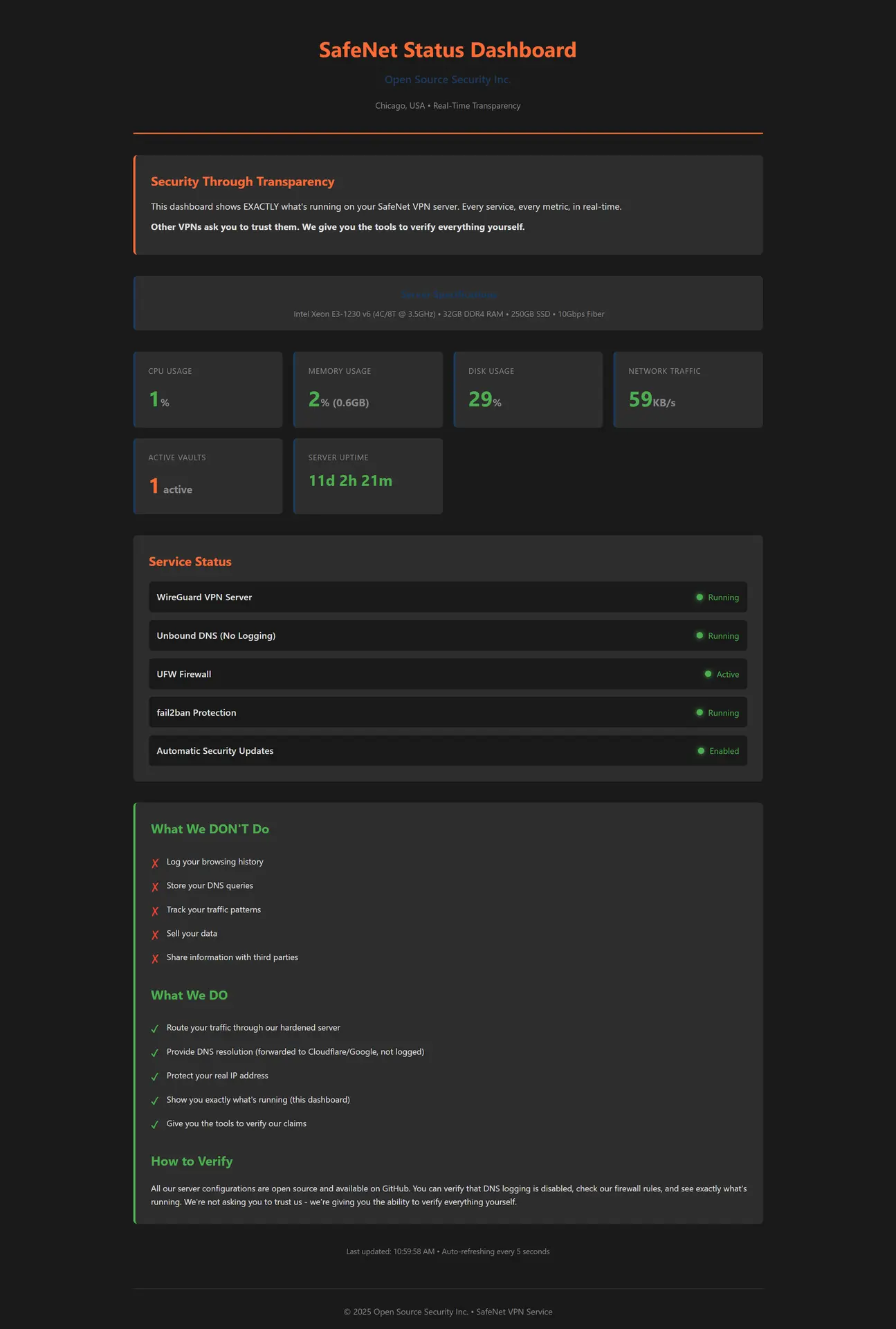
SafeNet subscribers get real-time visibility into server health. No other VPN shows you this level of transparency.
What You Can See
- • Server metrics: CPU, RAM, disk usage, network traffic
- • Service status: WireGuard, Unbound DNS, UFW firewall, fail2ban
- • Uptime: How long since last restart
- • Active vaults: Current connected customers (count only, not identities)
- • Privacy commitments: What we do and don't log
The status dashboard at status.oss-vpn.net is only accessible through the SafeNet tunnel. This ensures only paying subscribers can view server metrics, and confirms your tunnel is working.
Advanced: NetData Dashboard
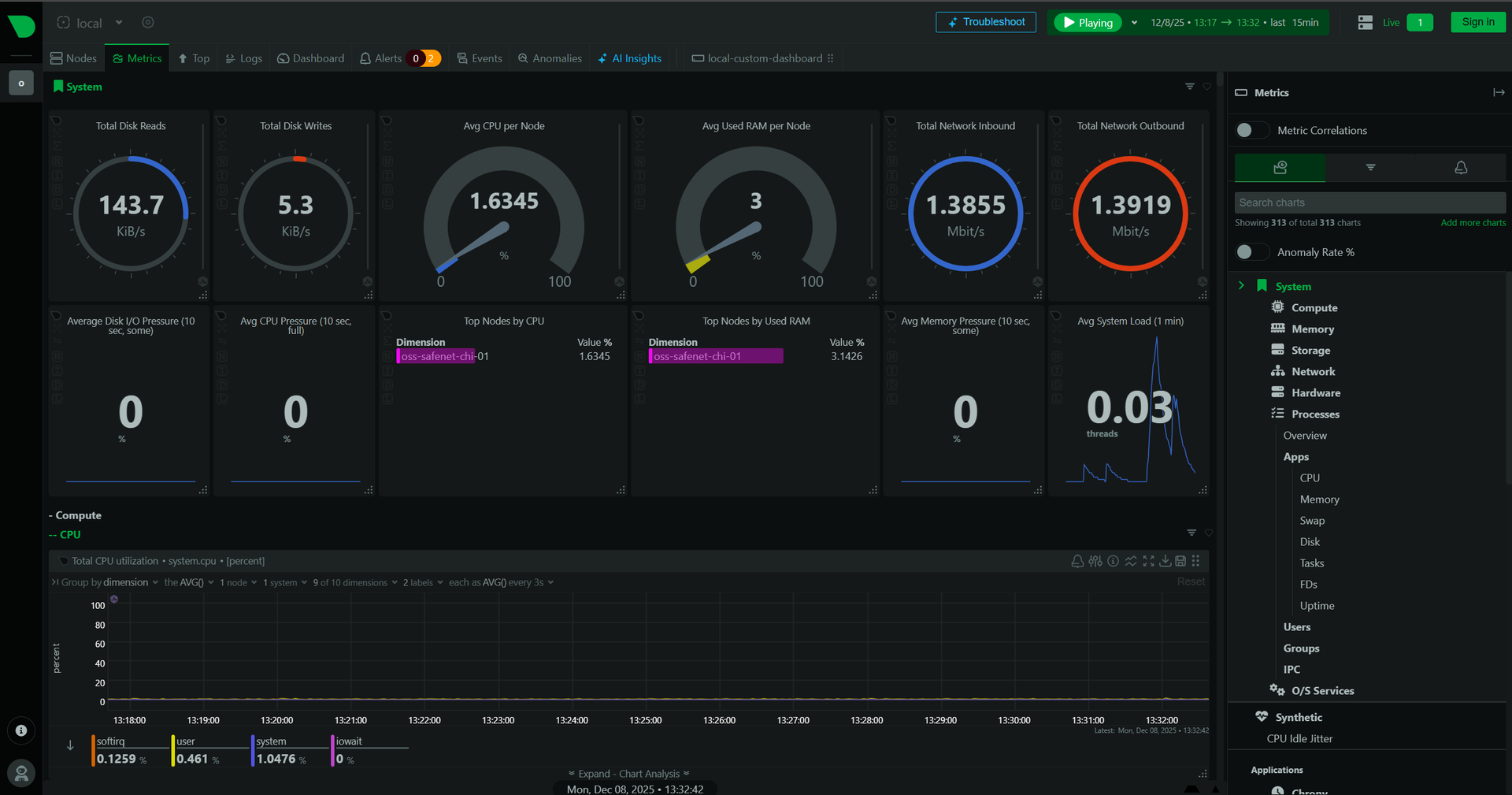
For deeper technical monitoring, SafeNet also runs NetData with 313 real-time charts covering system performance, network analysis, and anomaly detection.
Pricing & Free Trial
Simple, transparent pricing. No data caps. No device limits. One price covers your entire household, plus full support.
SafeNet VPN + Support
$9 /monthOr $89/year (save 18%)
First month included free with SecureNet consultation
Pay with Stripe or PayPal
What's Included
- • Private browsing VPN through Chicago server (NYC and LA coming soon)
- • Full support for everything OSS touches
- • Proactive support option (opt-in Monit alerts)
- • Real-time status dashboard access
- • WireGuard encryption for all SafeNet traffic
- • Zero DNS query logging
- • Unlimited bandwidth (no caps)
- • Unlimited devices (entire household)
- • Configuration transparency (GitHub)
- • First access to new features
What Happens When Trial Expires?
| If You Subscribe | If You Don't |
|---|---|
| Add a payment method (Stripe or PayPal) and everything continues. VPN, support, dashboard access. No interruption. | SafeNet quietly expires. No cancellation needed, no awkward emails. Your SecureNet still works, you just lose VPN and full support. |
Hardware support continues regardless: Even without SafeNet, we support hardware issues. If your Vault fails, we help coordinate Protectli warranty replacement. SafeNet subscription covers the software, configuration, and ongoing support.
Is SafeNet Right for You?
✓ Good Fit
- ✓ You want ISP privacy while browsing at home
- ✓ You want support for your OSS system
- ✓ You want whole-network VPN without per-device apps
- ✓ You value transparency and verification over trust
- ✓ You understand browse-only restrictions
- ✓ You already have (or are buying) SecureNet
✗ Not a Good Fit
- ✗ You need VPN for streaming services
- ✗ You need VPN for gaming (UDP)
- ✗ You need travel/mobile VPN protection
- ✗ You want to torrent
- ✗ You're comfortable troubleshooting on your own
- ✗ You don't have SecureNet hardware
Remember: SafeNet is optional. SecureNet provides enterprise-grade security with or without SafeNet. The subscription adds VPN privacy, full support, and proactive monitoring. It's not required for network protection.
Future Roadmap
SafeNet is just getting started. Here's what's coming for subscribers.
NYC & LA Servers
Additional server locations for better geographic coverage and lower latency.
Coming SoonAI Log Analysis
Automated analysis of your system logs to catch issues before they become problems.
Planned24/7 Active Monitoring
Staffed monitoring with immediate response to critical alerts, not just daily check-ins.
PlannedAdvanced Replacement
Hardware fails? We ship the replacement before you ship the broken one. Zero downtime.
PlannedSafeNet subscribers get first access to new features as they roll out. Your subscription supports continued development of the platform.
Configuration Transparency
Every SafeNet server configuration is published openly. Inspect our setup. Verify our claims. Hold us accountable.
What's Public
| Configuration | Location |
|---|---|
| Server setup scripts | GitHub → |
| WireGuard server config | GitHub → |
| Unbound DNS config | GitHub → |
| UFW firewall rules | GitHub → |
| Security hardening scripts | GitHub → |
What's Private (For Obvious Reasons)
- • WireGuard private keys
- • SSH keys
- • Customer public keys
- • Server IP addresses (use domain names)
For complete technical documentation of SafeNet architecture, download the AI Whitepaper. Upload it to ChatGPT or Claude to ask detailed questions about WireGuard configuration, privacy architecture, and server infrastructure.
Ready for Private Browsing + Full Support?
SafeNet is included free for your first 30 days with SecureNet. Schedule a free intro call to learn more about the complete system.
SafeNet VPN
Private browsing, full support, and complete transparency. Your ISP sees encrypted traffic. Nothing else.
What SafeNet Is (and Isn't)
SafeNet is more than a VPN. It's private browsing + full support + real-time transparency for SecureNet customers with Protectli Vaults. Connect to a SafeNet network and all your traffic automatically routes through our Chicago server. No apps to install, no per-device configuration.
Important: SafeNet is exclusive to SecureNet configurations on Protectli hardware. It is not a standalone VPN service you can purchase separately.
What SafeNet Includes
Private Browsing VPN
Your ISP sees only encrypted WireGuard traffic. They cannot see what websites you visit, what you search for, or what you do online.
Full Support
Everything OSS touches is supported. SecureNet configuration, SafeNet connectivity, hardware issues. Open a ticket, get help.
Real-Time Dashboard
See server health, your connection status, and active metrics. Full transparency into the infrastructure protecting your privacy.
What SafeNet Is NOT For
Travel or Coffee Shops
SafeNet protects your home network only. When you're at Starbucks, your phone isn't tunneled through SafeNet (unless you use a separate mobile VPN).
Streaming Services
Netflix, Hulu, Disney+, and YouTube are blocked by design. Streaming services also actively block VPNs anyway.
Gaming or Torrenting
UDP traffic is blocked to manage bandwidth and protect the service. Use your regular network for gaming.
Support Included
SafeNet isn't just a VPN. It's your support subscription for your entire OSS system. As long as you're a SafeNet subscriber, you have full support for everything OSS touches.
What's Covered
SecureNet configuration issues, SafeNet VPN connectivity, OPNsense questions, hardware troubleshooting, WiFi access point issues, network segmentation questions, Monit alerts, and anything else related to your OSS system.
What's Not Covered
Third-party devices on your network (NAS, Ubiquiti switches, smart home hubs). If we trace an issue to third-party hardware, we'll let you know and point you in the right direction.
How It Works
Open a ticket through our support portal. Best effort response during business hours. No phone calls, but thorough written support with video guides for common issues.
Hardware Support Forever
Even without SafeNet, we support hardware issues indefinitely. Protectli backs the hardware with a 2-year warranty. We coordinate RMA if something fails.
Think of it like insurance: Even if you never open a ticket, you have support when you need it. Most SecureNet systems just run. But when something goes wrong, you're not on your own.
Support Tiers
| Customer Type | Support Level |
|---|---|
| SafeNet Subscriber | Full support for everything OSS touches. Troubleshooting, guidance, proactive monitoring (if opted in). |
| Non-Subscriber (after trial) | Hardware support only. We send you a troubleshooting guide. If it's confirmed hardware failure, we coordinate RMA with Protectli. |
| Out of Warranty (2+ years) | Best-effort guidance. Hardware replacement at customer expense. |
Proactive Support (Opt-In)
Most support is reactive. Something breaks, you open a ticket, someone eventually responds. SafeNet offers something different: we can reach out to you before you even notice a problem.
How Proactive Support Works
- 1. During onboarding, you choose whether to opt in
- 2. Your Vault's Monit monitoring system sends alerts to both you AND OSS
- 3. If we see something concerning (LAN port down, CPU pegged, disk filling up), we email you
- 4. You get a heads-up before a small issue becomes a big problem
CPU usage, RAM usage, disk space, LAN port status, swap memory, and critical services. If your LAN port goes down or your SSD starts filling up (maybe a runaway log file), you'll know about it.
What We Monitor vs. What We Ignore
| We Reach Out | Normal (We Ignore) |
|---|---|
| LAN port down or flapping | ISP going up and down (that's your ISP's problem) |
| CPU pegged at 100% sustained | Brief CPU spikes (normal operation) |
| Disk filling up (90%+) | Normal disk usage growth |
| RAM exhausted, using swap | Normal RAM usage patterns |
Not 24/7 Monitoring: Proactive support means we check alerts daily and reach out if something looks wrong. It's not a staffed NOC watching your network around the clock. That's on the roadmap for the future.
How It Works
SafeNet creates an encrypted tunnel between your Protectli Vault and our Chicago server. Traffic on SafeNet networks is automatically routed through this tunnel.
Websites see: Chicago IP address | Your ISP sees: Encrypted WireGuard packets
Using SafeNet is Simple
- 1. Connect to a SafeNet network (WiFi or plug into Port 3)
- 2. Check your IP at whatismyip.com (you should see a Chicago IP)
- 3. Browse privately (that's it, all traffic is now tunneled)
SafeNet networks use 10.x.x.x IP addresses (like 10.60.60.x). If your device has a 10.x.x.x IP, your traffic is being tunneled. If it has a 192.168.x.x IP, you're on a regular network.
Server Infrastructure
SafeNet runs on dedicated hardware in a professional datacenter, not shared cloud instances.
Chicago Server (Live)
| Component | Specification |
|---|---|
| CPU | Intel Xeon E3-1230 v6 (4 cores / 8 threads @ 3.5GHz) |
| RAM | 32GB DDR4 |
| Storage | 250GB SSD |
| Network | 10 Gbps dedicated fiber (unmetered) |
| Operating System | Ubuntu Server 24.04 LTS |
| Location | Chicago, USA |
Security Hardening
| Feature | Configuration |
|---|---|
| SSH Authentication | Key-only (passwords disabled) |
| Brute Force Protection | fail2ban (3 failures = 1 hour ban) |
| Firewall | UFW (essential ports only) |
| Auto-Patching | unattended-upgrades enabled |
| IPv6 | Disabled |
| And more... | See full configuration on GitHub → |
Future Expansion
Additional servers planned for New York City and Los Angeles as subscriber base grows. Same hardware specifications, same security hardening, more geographic options.
WireGuard Protocol
SafeNet uses WireGuard, a modern VPN protocol that's faster, simpler, and more secure than traditional options like OpenVPN.
Why WireGuard?
| Metric | OpenVPN | WireGuard |
|---|---|---|
| Code Size | ~100,000 lines | ~4,000 lines (easier to audit) |
| Throughput Overhead | 30-50% overhead | 5-15% overhead |
| CPU Overhead | High (userspace processing) | Low (in-kernel on OPNsense) |
| Configuration | 50+ lines, certificates | 10 lines, public/private keys |
| Connection Handling | Requires reconnect on IP change | Seamless roaming |
Encryption Stack
| Component | Algorithm |
|---|---|
| Encryption | ChaCha20 |
| Authentication | Poly1305 |
| Key Exchange | Curve25519 (ECDH) |
| Hashing | BLAKE2s |
Browse-Only Policy
SafeNet enforces a browse-only policy by design. This isn't a limitation. It's how we keep the service fast, legal, and affordable for everyone.
✓ Allowed
- • Web browsing (HTTP/HTTPS)
- • Email (IMAP, SMTP, POP3)
- • Mobile apps (most use TCP)
- • Embedded video in web pages
- • Standard TCP protocols
✗ Blocked
- • Streaming (Netflix, Hulu, Disney+, YouTube)
- • Torrenting / P2P
- • UDP gaming
- • VoIP / Video calls (Zoom, Teams, Discord)
- • FTP
Why These Restrictions?
| Reason | Explanation |
|---|---|
| Bandwidth Management | 200 customers sharing 10 Gbps requires control. One 4K stream is 25 Mbps. Multiply by many users and the server saturates. |
| Legal Protection | No torrenting means no piracy liability for OSS or our customers. |
| Server Cost Control | Streaming = massive bandwidth = higher costs = higher prices. Browse-only keeps SafeNet at $9/month. |
Note on VoIP: VoIP quality suffers through any VPN tunnel due to latency. Your other networks (Home, Smart, Guest) have unrestricted internet with QoS priority for voice traffic. Use those for video calls.
Enforcement Methods
- • Protocol blocking: UDP blocked (kills streaming, gaming, VoIP)
- • DNS filtering: Streaming CDNs return NXDOMAIN (netflix.com, disneyplus.com, etc.)
Privacy Architecture
Most VPNs ask you to trust them. We give you the tools to verify. Here's exactly what we log, what we don't, and what that means for your privacy.
What the Server Knows vs. Doesn't Know
| Server KNOWS | Server DOES NOT Know |
|---|---|
| Your tunnel IP (10.200.0.x) | Your DNS queries |
| Your WireGuard public key | Websites you visit |
| Connection status (online/offline) | Your browsing history |
| Total bandwidth (aggregate) | Connection timestamps |
DNS Privacy
SafeNet uses a local Unbound DNS resolver on the Chicago server with zero query logging. Your DNS queries are:
- 1. Encrypted through the WireGuard tunnel to Chicago
- 2. Resolved by Unbound (not logged)
- 3. Forwarded to Cloudflare/Google (they see server IP, not yours)
Data Availability
OSS cannot provide data it does not collect. Our zero-logging architecture means this data simply does not exist on our servers.
| Scenario | What Exists On Server | What Does Not Exist |
|---|---|---|
| Government subpoena | Public key, tunnel IP, bandwidth total | DNS queries, browsing history, timestamps |
| Server compromise | Peer configs, current connections | Customer names, DNS history, browsing data |
| ISP request | Encrypted packets to/from server | Any content or queries |
All server configurations are published on GitHub. You can verify that DNS logging is disabled, check our firewall rules, and see exactly what's running. We're not asking you to trust us. We're giving you the ability to verify everything yourself.
Network Access Methods
SafeNet provides two ways to route traffic through the VPN tunnel: WiFi and wired Ethernet.
📶 SafeNet WiFi (VLAN 60)
10.60.60.0/24Connect any WiFi device to the SafeNet SSID. Phones, tablets, laptops: all automatically tunneled.
🔌 SafeNet Port (Port 3)
10.70.70.0/24Plug Ethernet devices into Port 3 on the Vault. Desktop computers, printers, or add an unmanaged switch for multiple devices.
Visual Confirmation
| Your Device IP | Meaning | Traffic Route |
|---|---|---|
10.60.60.x |
SafeNet WiFi | Through Chicago tunnel |
10.70.70.x |
SafeNet Port | Through Chicago tunnel |
192.168.x.x |
Regular network | Direct to ISP (not tunneled) |
Pro Tip: Only use SafeNet when you need private browsing. Your other networks (Home, Smart, Guest) have unrestricted internet access with no VPN overhead. Switch networks based on what you're doing.
Status Dashboard
SafeNet subscribers get real-time visibility into server health. No other VPN shows you this level of transparency.
What You Can See
- • Server metrics: CPU, RAM, disk usage, network traffic
- • Service status: WireGuard, Unbound DNS, UFW firewall, fail2ban
- • Uptime: How long since last restart
- • Active vaults: Current connected customers (count only, not identities)
- • Privacy commitments: What we do and don't log
The status dashboard at status.oss-vpn.net is only accessible through the SafeNet tunnel. This ensures only paying subscribers can view server metrics, and confirms your tunnel is working.
Advanced: NetData Dashboard
For deeper technical monitoring, SafeNet also runs NetData with 313 real-time charts covering system performance, network analysis, and anomaly detection.
Pricing & Free Trial
Simple, transparent pricing. No data caps. No device limits. One price covers your entire household, plus full support.
SafeNet VPN + Support
$9 /monthOr $89/year (save 18%)
First month included free with SecureNet consultation
Pay with Stripe or PayPal
What's Included
- • Private browsing VPN through Chicago server (NYC and LA coming soon)
- • Full support for everything OSS touches
- • Proactive support option (opt-in Monit alerts)
- • Real-time status dashboard access
- • WireGuard encryption for all SafeNet traffic
- • Zero DNS query logging
- • Unlimited bandwidth (no caps)
- • Unlimited devices (entire household)
- • Configuration transparency (GitHub)
- • First access to new features
What Happens When Trial Expires?
| If You Subscribe | If You Don't |
|---|---|
| Add a payment method (Stripe or PayPal) and everything continues. VPN, support, dashboard access. No interruption. | SafeNet quietly expires. No cancellation needed, no awkward emails. Your SecureNet still works, you just lose VPN and full support. |
Hardware support continues regardless: Even without SafeNet, we support hardware issues. If your Vault fails, we help coordinate Protectli warranty replacement. SafeNet subscription covers the software, configuration, and ongoing support.
Is SafeNet Right for You?
✓ Good Fit
- ✓ You want ISP privacy while browsing at home
- ✓ You want support for your OSS system
- ✓ You want whole-network VPN without per-device apps
- ✓ You value transparency and verification over trust
- ✓ You understand browse-only restrictions
- ✓ You already have (or are buying) SecureNet
✗ Not a Good Fit
- ✗ You need VPN for streaming services
- ✗ You need VPN for gaming (UDP)
- ✗ You need travel/mobile VPN protection
- ✗ You want to torrent
- ✗ You're comfortable troubleshooting on your own
- ✗ You don't have SecureNet hardware
Remember: SafeNet is optional. SecureNet provides enterprise-grade security with or without SafeNet. The subscription adds VPN privacy, full support, and proactive monitoring. It's not required for network protection.
Future Roadmap
SafeNet is just getting started. Here's what's coming for subscribers.
NYC & LA Servers
Additional server locations for better geographic coverage and lower latency.
Coming SoonAI Log Analysis
Automated analysis of your system logs to catch issues before they become problems.
Planned24/7 Active Monitoring
Staffed monitoring with immediate response to critical alerts, not just daily check-ins.
PlannedAdvanced Replacement
Hardware fails? We ship the replacement before you ship the broken one. Zero downtime.
PlannedSafeNet subscribers get first access to new features as they roll out. Your subscription supports continued development of the platform.
Configuration Transparency
Every SafeNet server configuration is published openly. Inspect our setup. Verify our claims. Hold us accountable.
What's Public
| Configuration | Location |
|---|---|
| Server setup scripts | GitHub → |
| WireGuard server config | GitHub → |
| Unbound DNS config | GitHub → |
| UFW firewall rules | GitHub → |
| Security hardening scripts | GitHub → |
What's Private (For Obvious Reasons)
- • WireGuard private keys
- • SSH keys
- • Customer public keys
- • Server IP addresses (use domain names)
For complete technical documentation of SafeNet architecture, download the AI Whitepaper. Upload it to ChatGPT or Claude to ask detailed questions about WireGuard configuration, privacy architecture, and server infrastructure.
Ready for Private Browsing + Full Support?
SafeNet is included free for your first 30 days with SecureNet. Schedule a free intro call to learn more about the complete system.