SecureNet OS
Enterprise-grade OPNsense, professionally configured for your home network. You own the hardware. No subscriptions required.
*Updated daily - your security stays current automatically
What Is SecureNet OS?
SecureNet OS is OPNsense: a proven, open-source firewall trusted by millions, professionally configured specifically for home network security.
You purchase the hardware through our Protectli partner page. You own it outright. The firewall works completely without any subscriptions. Optional services like SafeNet VPN and Zenarmor filtering are available but never required.
The Problem We Solve: Home network security is complex. Professional security requires expertise most homeowners don't have and don't want to learn. SecureNet provides enterprise-grade protection for people who don't want to become network engineers.

Network Architecture
SecureNet OS implements 8 separate networks: 3 physical (full access) and 5 virtual VLANs (restricted). Each network isolates devices by trust level and use case.
The 8 Networks
LAN1 (Admin/Home)
Primary trusted devices with full access. Your computers, phones, tablets. Can access firewall GUI and all other networks.
LAN2 (Backup)
Hardware failover network. If Port 1 fails, plug into Port 4. Internet restored in 30 seconds.
IoT VLAN
Security cameras, doorbells, motion sensors. Internet-only access: can't reach your computers or NAS if compromised.
Smart VLAN
Smart TVs, Sonos speakers, robot vacuums. Isolated from internal networks: TV spyware can't access your work laptop.
Guest VLAN
Visitor WiFi. Zero internal visibility: guests can't see other guests, can't discover internal services, can't reach firewall GUI.
Kids VLAN
Children's devices with DNS filtering. Blocks adult content, gambling, drugs. Network isolation + content filtering.
SafeNet VLAN
WiFi VPN tunnel. All traffic routes through Chicago SafeNet server. For privacy-focused browsing.
SafeNet Port
Wired VPN on Port 3. Plug in ethernet devices that need VPN: home office setup, devices without VPN clients.
IP Addressing Strategy
SecureNet uses deliberate IP patterns so you can visually identify your routing path without technical knowledge:
| IP Pattern | Meaning | Routing |
|---|---|---|
192.168.x.x |
Standard networks | Direct to ISP (untunneled) |
10.x.x.x |
SafeNet networks | Through VPN tunnel (Chicago) |
Quick Check: Look at your device's IP address. If it starts with 192.168, you're going direct to your ISP. If it starts with 10, you're tunneled through SafeNet VPN.
Port Assignments
| Port | Interface | Purpose |
|---|---|---|
| Port 1 (Left) | LAN + VLANs | Primary admin + VLAN trunk to WiFi AP |
| Port 2 | WAN | Internet gateway (connects to ISP modem) |
| Port 3 | SafeNet Port | Wired VPN for ethernet devices |
| Port 4 (Right) | LAN2 Backup | Hardware failover if Port 1 fails |
Firewall Rules & VLAN Isolation
Every restricted VLAN uses an identical 3-rule pattern that enforces complete isolation while maintaining usability.
The 3-Rule Isolation Pattern
Pass: VLAN net → VLAN net (AirPlay, Chromecast, local gaming)
# Rule 2: Block ALL internal networks
Block: VLAN net → RFC1918 (192.168.0.0/16, 172.16.0.0/12, 10.0.0.0/8)
# Rule 3: Allow internet access
Pass: VLAN net → * (only public IPs remain after Rule 2)
This pattern means a device on your IoT VLAN can reach the internet and talk to other IoT devices, but it cannot reach your computers, your NAS, your admin network, or any other VLAN. Period.
Attack Scenarios Prevented
-
Compromised IoT Camera Attacker gains camera shell, scans for NAS. All blocked. Attack stops at camera.
-
Malicious Guest Guest with hacking tools scans 192.168.1.0/24. Sees nothing. Zero visibility into your internal network.
-
Smart TV Spyware Pre-installed TV spyware tries to find SMB shares. Blocked. Work documents stay safe.
Future-Proof: The RFC1918 alias covers ALL private address space. Any new VLAN you add is automatically protected without updating firewall rules.
Suricata IDS/IPS
Suricata is the first layer of our two-layer security architecture. It sits on the WAN interface, inspecting all internet traffic before it reaches your internal networks.
Configuration
| Parameter | Value |
|---|---|
| Interface | WAN (perimeter defense) |
| Mode | IPS: blocking, not just alerting |
| Pattern Matcher | Hyperscan (Intel optimized) |
| Total Signatures | ~165K active rules* |
| Updates | Daily automatic (cron at midnight) |
Ruleset Breakdown (Updates Daily)*
We selected rulesets that maximize home network protection without false positives:
| Source | Signatures | What It Catches |
|---|---|---|
| Abuse.ch ThreatFox | 104,556+ | Active campaign indicators of compromise (IOCs) |
| Abuse.ch URLhaus | 30,579+ | Malicious URLs, phishing, exploit kits |
| Abuse.ch SSL Fingerprint | 8,489+ | Malicious SSL/TLS certificates |
| ET emerging-malware | 16,891+ | Trojans, ransomware, spyware |
| ET emerging-exploit | 1,657+ | CVE exploits, buffer overflows, RCE |
| ET emerging-phishing | 2,757+ | Credential theft, fake login pages |
| ET emerging-scan | 285+ | Port scanning, reconnaissance |
| Feodo Tracker + others | ~126+ | Botnet C&C, worms, DoS, current events |
*Signature counts update daily as new threats are discovered and old ones expire.
Performance with Full Security Stack (Lab Validated)
All performance numbers validated in our Security Performance Lab with real traffic patterns:
| Hardware | Throughput | Packet Loss | Added Latency |
|---|---|---|---|
| Protectli V1410 | ~1.2 Gbps | 0% | <5ms |
| Protectli VP2430 | ~1.7 Gbps | 0% | <5ms |
Real-World Context: Typical peak household usage is 150-200 Mbps (4x 4K streams + 2 video calls + gaming). SecureNet has 6-10x headroom above typical peak usage, even with full IDS/IPS inspection enabled.
DNS Filtering & Ad Blocking
Unbound DNS runs locally on your SecureNet firewall, resolving queries faster than remote servers while blocking malicious domains and ads before any connection is made.
Self-Hosted Blocklists
We aggregate multiple trusted sources into a single, deduplicated blocklist hosted on our own infrastructure at oss-blocklist.net.
Why Self-Hosted? We control uptime (not dependent on GitHub or third parties). Dead feeds get replaced transparently. Customer firewalls always receive updated lists. Format is guaranteed consistent.
DNS Blocklist Sources (1 million + domains)*
| Source | Focus |
|---|---|
| Hagezi Pro++ | Aggressive malware, tracking, and ads (~800K domains) |
| OISD Big | Balanced coverage with low false positives |
| Steven Black Unified | Conservative malware and adware |
| 1Hosts Pro | Malware, tracking, and suspicious domains |
| OSS Community | Customer-reported malicious domains and ads |
IP Blocklist Sources (~45,000 IPs)*
| Source | Focus |
|---|---|
| Spamhaus DROP | Hijacked networks, criminal operations |
| DShield Top 20 | Active attackers from real-world data |
| Hagezi TIF | C2 servers, malware hosting |
| OSS Community | Customer-reported malicious IPs |
*Counts update daily as sources refresh and community reports are added.
See an ad that slipped through? Find a malicious site we missed? Report it and we'll add it to the OSS Community list. Your feedback improves protection for everyone.
Network-Wide Ad Blocking
Unlike browser extensions that only protect one device, SecureNet blocks ads at the DNS level for your entire network. This means ad blocking on devices that can't run extensions: smart TVs, Roku, Apple TV, game consoles, and IoT devices.
Included Free: Ad blocking is built into the DNS filtering you already have. No extra cost, no configuration needed. Works on every device connected to your network.
Whitelist Process
If a legitimate site gets blocked (false positive):
- 1. You report it to OSS
- 2. We verify the domain is safe
- 3. We add it to our whitelist
- 4. Next daily refresh fixes it. No action required on your end.
Two-Layer Protection
DNS filtering and IP blocking work together to catch threats that slip through one layer:
| Threat Scenario | DNS Layer | IP Layer |
|---|---|---|
| New domain + new IP | ❌ Misses | ❌ Misses |
| New domain + known bad IP | ❌ Misses | ✅ Blocked |
| Known bad domain + new IP | ✅ Blocked | ❌ Misses |
| Known bad domain + known bad IP | ✅ Blocked | ✅ Blocked |
DNS over TLS
All DNS queries from your network are encrypted before leaving your home. Your ISP cannot see what websites you're visiting.
Configuration
| Setting | Value | Why |
|---|---|---|
| Primary | Quad9 (9.9.9.9:853) | Non-profit, Swiss jurisdiction, no query logging |
| Backup | Cloudflare (1.1.1.1:853) | Fastest public DNS, KPMG-audited privacy |
| Encryption | TLS 1.3 | Latest standard |
What Your ISP Sees
❌ Without DNS over TLS
ISP sees every domain you query: netflix.com, bankofamerica.com, webmd.com...
They can build a complete profile of your browsing habits, sell it to advertisers, or comply with requests without your knowledge.
✅ With SecureNet DoT
ISP sees: encrypted connection to 9.9.9.9:853
They know you're making DNS queries. They cannot see what domains you're querying.
Why Not Google DNS? SecureNet prioritizes DNS providers whose incentives align with user privacy. We use Quad9 (a non-profit with no logging) and Cloudflare (audited privacy practices and no advertising business).
Hardware Monitoring (Monit)
Monit watches your firewall hardware 24/7 and sends email alerts before problems become crises.
What's Monitored
-
Port 1 NIC Status Intel i226 NICs can fail. Monit detects link-down and alerts you. 1-hour delay prevents false positives from brief outages.
-
CPU Usage Alert at 95%+. Could indicate DDoS attack, malware, or IDS overload.
-
Memory Usage Alert at 90%+. Detects memory leaks or SYN flood attacks.
-
Disk Space Alert at 90%+. Log growth can fill disks over time.
-
Unbound DNS If DNS crashes, Monit automatically restarts it and alerts you. Self-healing: fixed before you notice.
Port 1 Failover Procedure
If Port 1 NIC fails (you receive Monit alert):
2. Move ethernet cable from Port 1 → Port 4
3. Plug power back in
4. Wait 2 minutes for boot
5. Internet restored
# Note: VLANs won't work on Port 4. Only main network.
# Contact OSS for warranty replacement
Zenarmor Application Firewall
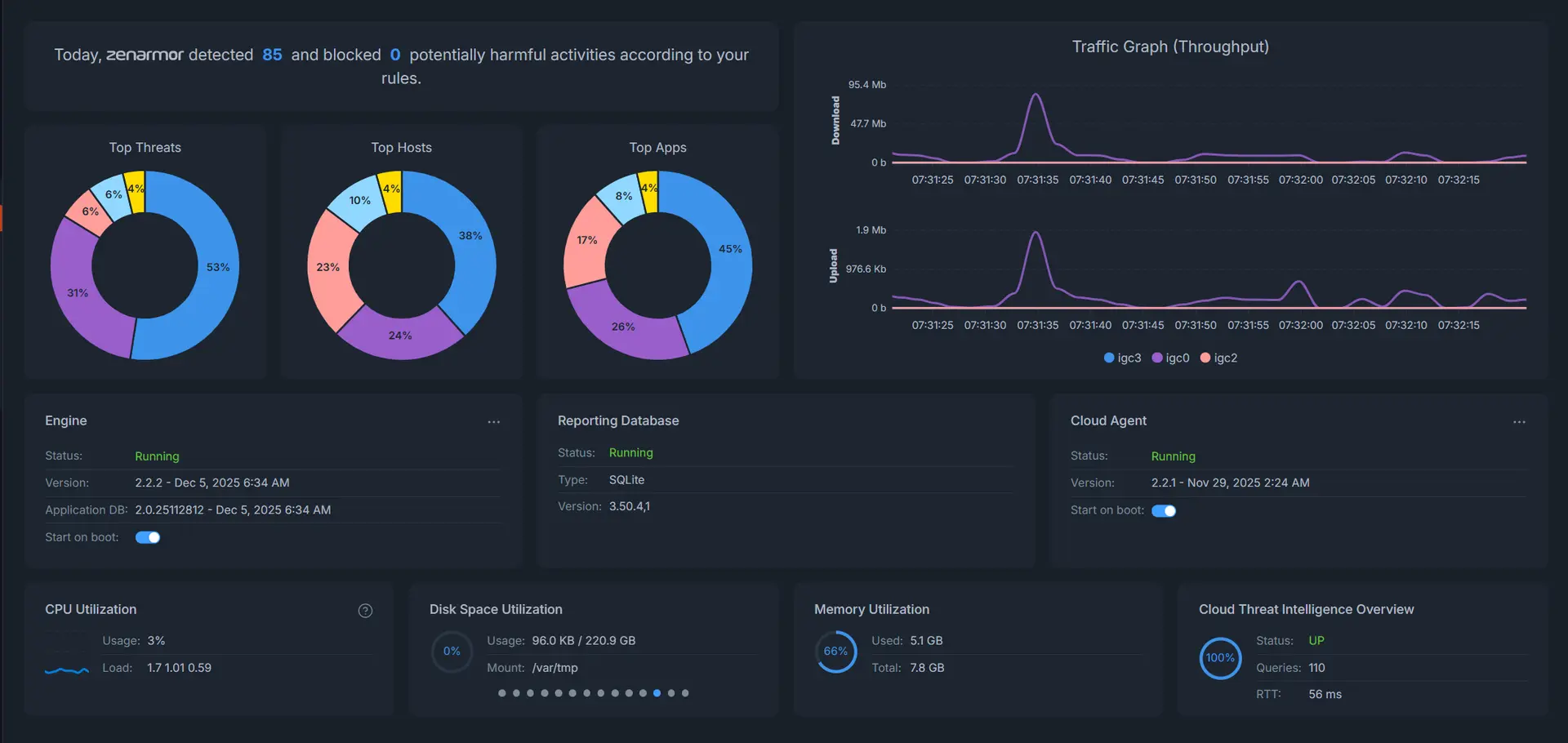
Zenarmor is the second layer of our two-layer security architecture. While Suricata inspects traffic at the WAN perimeter, Zenarmor monitors LAN traffic and identifies applications regardless of encryption.
What Zenarmor Catches That Suricata Can't
| Scenario | Suricata (WAN) | Zenarmor (LAN) |
|---|---|---|
| Compromised device scanning internal network | Can't see (internal traffic) | Detects abnormal scanning |
| HTTPS malware from legitimate CDN | Sees valid HTTPS, passes | Detects behavioral anomaly |
| Bandwidth abuse (torrenting) | Sees encrypted traffic | Identifies BitTorrent application |
| Policy violations (TikTok on Kids VLAN) | Can't distinguish apps | Identifies and can block application |
Free vs Paid Tiers
✅ Free Tier (Included)
- • Application visibility
- • Device identification
- • Real-time traffic analysis
- • Dashboard & reporting
- • DPI / TLS fingerprinting
⭐ Home Tier ($10/month)
- • Everything in Free
- • 3 custom blocking policies
- • Application blocking
- • Web category filtering
- • Time-based controls
- • Safe search enforcement
OSS Recommendation: $10/month is excellent value for the visibility you get. Especially valuable for families who want parental controls. But the free tier is fully functional for monitoring.
Support Boundaries
OSS provides: Installation, configuration, and brief dashboard tutorial during onboarding.
Zenarmor provides: Ongoing support, feature training, policy creation help, troubleshooting.
Zenarmor Resources
- • Zenarmor YouTube Channel (Excellent tutorials)
- • Zenarmor Documentation
- • Zenarmor Blog
WireGuard VPN Integration
SecureNet includes pre-configured WireGuard integration for SafeNet VPN subscribers. Traffic from SafeNet networks routes through our Chicago server automatically.
Policy-Based Routing
| Network | Routing |
|---|---|
| Home, IoT, Smart, Guest, Kids | Direct to ISP (no VPN) |
| SafeNet VLAN (10.60.60.0/24) | Through Chicago WireGuard tunnel |
| SafeNet Port (10.70.70.0/24) | Through Chicago WireGuard tunnel |
Connect to SafeNet WiFi when you want private browsing. Connect to your regular network for everything else. No apps to install, no settings to change. It's automatic.
Learn More: SafeNet VPN is covered in detail on the SafeNet page →
Coreboot Firmware
OSS Vaults ship with Protectli's coreboot firmware: an open-source BIOS replacement that provides firmware-level transparency.
Fully Open Stack
| Layer | Component | Open Source? |
|---|---|---|
| Firmware | Coreboot | ✅ Yes |
| Operating System | OPNsense (FreeBSD) | ✅ Yes |
| Configuration | SecureNet OS | ✅ Yes (GitHub) |
| VPN Protocol | WireGuard | ✅ Yes |
From boot firmware through VPN tunnel, every component is publicly reviewable and independently auditable. No black boxes.
WiFi Access Point
SecureNet includes a TP-Link EAP720 access point configured in Stand Alone mode: no cloud dependency, no subscriptions, full VLAN support.
Specifications
| Feature | Value |
|---|---|
| WiFi Standard | WiFi 7 (802.11be) with MLO |
| 2.4GHz Speed | Up to 344 Mbps |
| 5GHz Speed | Up to 2,882 Mbps |
| SSIDs | 6 per band (one per VLAN) |
| VLAN Support | Full 802.1Q tagging |
| Coverage | ~1,500 sq ft per AP |
| Management | Stand Alone (local web interface) |
Expansion: Homes over 1,500 sq ft can add additional EAP720 access points. Wired backhaul recommended for best performance.
What's Included
One-Time Purchase (You Own Everything)
-
Protectli Vault (V1410 or VP2430) Fanless firewall appliance with 2-year hardware warranty
-
TP-Link EAP720 Access Point WiFi 7 with full VLAN support
-
SecureNet OS Pre-Installed Works on arrival. No configuration required.
-
$100 Onboarding Consultation 25-minute video call to customize for your home
-
ZFS Snapshot + Encrypted Backup Known-good restore point after onboarding
-
Network Documentation Diagram, failover procedures, restore instructions
Optional Subscriptions
| Service | Price | What You Get |
|---|---|---|
| SafeNet VPN | $9/mo or $89/yr | Private browsing through Chicago server + Full Support |
| Zenarmor Home | $10/mo | Application blocking, parental controls |
No subscriptions required. The firewall provides complete security functionality without SafeNet or Zenarmor. These are optional enhancements, not requirements.
Is SecureNet Right for You?
We're honest about who SecureNet is, and isn't, designed for.
✅ Good Fit
- ✓ Want professional security without learning networking
- ✓ Value owning hardware with no mandatory subscriptions
- ✓ Won't tinker with the configuration
- ✓ ISP modem supports bridge mode
- ✓ Want transparency: able to verify every claim
❌ Not a Good Fit
- ✗ Want to learn and experiment with OPNsense
- ✗ Need 24/7 phone support
- ✗ ISP won't allow bridge mode
- ✗ Plan to heavily customize the configuration
- ✗ Want a learning platform, not a finished product
Want to DIY? Our configurations are published on GitHub. OPNsense is free and open source. You can absolutely replicate this yourself, but expect 25-35 hours for a first-time build and 4-6 hours/month ongoing maintenance. SecureNet is for people who want the result without the project.
Configuration Transparency
Everything is published. Verify every claim we make.
What's Public
- • SecureNet OS configurations: GitHub
- • SafeNet server configurations: GitHub
- • Security Performance Lab methodology: GitHub
- • AI Whitepaper: 50-page technical reference
- • DNS blocklist sources and methodology
- • Suricata ruleset selection rationale
What's NOT Public
- • Private keys
- • Customer-specific passwords
- • That's it.
Ready to Secure Your Network?
Schedule a free 10-minute introduction call. We'll verify ISP compatibility, answer questions, and make sure SecureNet is right for you.
SecureNet OS
Enterprise-grade OPNsense, professionally configured for your home network. You own the hardware. No subscriptions required.
*Updated daily - your security stays current automatically
What Is SecureNet OS?
SecureNet OS is OPNsense: a proven, open-source firewall trusted by millions, professionally configured specifically for home network security.
You purchase the hardware through our Protectli partner page. You own it outright. The firewall works completely without any subscriptions. Optional services like SafeNet VPN and Zenarmor filtering are available but never required.
The Problem We Solve: Home network security is complex. Professional security requires expertise most homeowners don't have and don't want to learn. SecureNet provides enterprise-grade protection for people who don't want to become network engineers.
Network Architecture
SecureNet OS implements 8 separate networks: 3 physical (full access) and 5 virtual VLANs (restricted). Each network isolates devices by trust level and use case.
The 8 Networks
LAN1 (Admin/Home)
Primary trusted devices with full access. Your computers, phones, tablets. Can access firewall GUI and all other networks.
LAN2 (Backup)
Hardware failover network. If Port 1 fails, plug into Port 4. Internet restored in 30 seconds.
IoT VLAN
Security cameras, doorbells, motion sensors. Internet-only access: can't reach your computers or NAS if compromised.
Smart VLAN
Smart TVs, Sonos speakers, robot vacuums. Isolated from internal networks: TV spyware can't access your work laptop.
Guest VLAN
Visitor WiFi. Zero internal visibility: guests can't see other guests, can't discover internal services, can't reach firewall GUI.
Kids VLAN
Children's devices with DNS filtering. Blocks adult content, gambling, drugs. Network isolation + content filtering.
SafeNet VLAN
WiFi VPN tunnel. All traffic routes through Chicago SafeNet server. For privacy-focused browsing.
SafeNet Port
Wired VPN on Port 3. Plug in ethernet devices that need VPN: home office setup, devices without VPN clients.
IP Addressing Strategy
SecureNet uses deliberate IP patterns so you can visually identify your routing path without technical knowledge:
| IP Pattern | Meaning | Routing |
|---|---|---|
192.168.x.x |
Standard networks | Direct to ISP (untunneled) |
10.x.x.x |
SafeNet networks | Through VPN tunnel (Chicago) |
Quick Check: Look at your device's IP address. If it starts with 192.168, you're going direct to your ISP. If it starts with 10, you're tunneled through SafeNet VPN.
Port Assignments
| Port | Interface | Purpose |
|---|---|---|
| Port 1 (Left) | LAN + VLANs | Primary admin + VLAN trunk to WiFi AP |
| Port 2 | WAN | Internet gateway (connects to ISP modem) |
| Port 3 | SafeNet Port | Wired VPN for ethernet devices |
| Port 4 (Right) | LAN2 Backup | Hardware failover if Port 1 fails |
Firewall Rules & VLAN Isolation
Every restricted VLAN uses an identical 3-rule pattern that enforces complete isolation while maintaining usability.
The 3-Rule Isolation Pattern
Pass: VLAN net → VLAN net (AirPlay, Chromecast, local gaming)
# Rule 2: Block ALL internal networks
Block: VLAN net → RFC1918 (192.168.0.0/16, 172.16.0.0/12, 10.0.0.0/8)
# Rule 3: Allow internet access
Pass: VLAN net → * (only public IPs remain after Rule 2)
This pattern means a device on your IoT VLAN can reach the internet and talk to other IoT devices, but it cannot reach your computers, your NAS, your admin network, or any other VLAN. Period.
Attack Scenarios Prevented
-
Compromised IoT Camera Attacker gains camera shell, scans for NAS. All blocked. Attack stops at camera.
-
Malicious Guest Guest with hacking tools scans 192.168.1.0/24. Sees nothing. Zero visibility into your internal network.
-
Smart TV Spyware Pre-installed TV spyware tries to find SMB shares. Blocked. Work documents stay safe.
Future-Proof: The RFC1918 alias covers ALL private address space. Any new VLAN you add is automatically protected without updating firewall rules.
Suricata IDS/IPS
Suricata is the first layer of our two-layer security architecture. It sits on the WAN interface, inspecting all internet traffic before it reaches your internal networks.
Configuration
| Parameter | Value |
|---|---|
| Interface | WAN (perimeter defense) |
| Mode | IPS: blocking, not just alerting |
| Pattern Matcher | Hyperscan (Intel optimized) |
| Total Signatures | ~165K active rules* |
| Updates | Daily automatic (cron at midnight) |
Ruleset Breakdown (Updates Daily)*
We selected rulesets that maximize home network protection without false positives:
| Source | Signatures | What It Catches |
|---|---|---|
| Abuse.ch ThreatFox | 104,556+ | Active campaign indicators of compromise (IOCs) |
| Abuse.ch URLhaus | 30,579+ | Malicious URLs, phishing, exploit kits |
| Abuse.ch SSL Fingerprint | 8,489+ | Malicious SSL/TLS certificates |
| ET emerging-malware | 16,891+ | Trojans, ransomware, spyware |
| ET emerging-exploit | 1,657+ | CVE exploits, buffer overflows, RCE |
| ET emerging-phishing | 2,757+ | Credential theft, fake login pages |
| ET emerging-scan | 285+ | Port scanning, reconnaissance |
| Feodo Tracker + others | ~126+ | Botnet C&C, worms, DoS, current events |
*Signature counts update daily as new threats are discovered and old ones expire.
Performance with Full Security Stack (Lab Validated)
All performance numbers validated in our Security Performance Lab with real traffic patterns:
| Hardware | Throughput | Packet Loss | Added Latency |
|---|---|---|---|
| Protectli V1410 | ~1.2 Gbps | 0% | <5ms |
| Protectli VP2430 | ~1.7 Gbps | 0% | <5ms |
Real-World Context: Typical peak household usage is 150-200 Mbps (4x 4K streams + 2 video calls + gaming). SecureNet has 6-10x headroom above typical peak usage, even with full IDS/IPS inspection enabled.
DNS Filtering & Ad Blocking
Unbound DNS runs locally on your SecureNet firewall, resolving queries faster than remote servers while blocking malicious domains and ads before any connection is made.
Self-Hosted Blocklists
We aggregate multiple trusted sources into a single, deduplicated blocklist hosted on our own infrastructure at oss-blocklist.net.
Why Self-Hosted? We control uptime (not dependent on GitHub or third parties). Dead feeds get replaced transparently. Customer firewalls always receive updated lists. Format is guaranteed consistent.
DNS Blocklist Sources (1 million + domains)*
| Source | Focus |
|---|---|
| Hagezi Pro++ | Aggressive malware, tracking, and ads (~800K domains) |
| OISD Big | Balanced coverage with low false positives |
| Steven Black Unified | Conservative malware and adware |
| 1Hosts Pro | Malware, tracking, and suspicious domains |
| OSS Community | Customer-reported malicious domains and ads |
IP Blocklist Sources (~45,000 IPs)*
| Source | Focus |
|---|---|
| Spamhaus DROP | Hijacked networks, criminal operations |
| DShield Top 20 | Active attackers from real-world data |
| Hagezi TIF | C2 servers, malware hosting |
| OSS Community | Customer-reported malicious IPs |
*Counts update daily as sources refresh and community reports are added.
See an ad that slipped through? Find a malicious site we missed? Report it and we'll add it to the OSS Community list. Your feedback improves protection for everyone.
Network-Wide Ad Blocking
Unlike browser extensions that only protect one device, SecureNet blocks ads at the DNS level for your entire network. This means ad blocking on devices that can't run extensions: smart TVs, Roku, Apple TV, game consoles, and IoT devices.
Included Free: Ad blocking is built into the DNS filtering you already have. No extra cost, no configuration needed. Works on every device connected to your network.
Whitelist Process
If a legitimate site gets blocked (false positive):
- 1. You report it to OSS
- 2. We verify the domain is safe
- 3. We add it to our whitelist
- 4. Next daily refresh fixes it. No action required on your end.
Two-Layer Protection
DNS filtering and IP blocking work together to catch threats that slip through one layer:
| Threat Scenario | DNS Layer | IP Layer |
|---|---|---|
| New domain + new IP | ❌ Misses | ❌ Misses |
| New domain + known bad IP | ❌ Misses | ✅ Blocked |
| Known bad domain + new IP | ✅ Blocked | ❌ Misses |
| Known bad domain + known bad IP | ✅ Blocked | ✅ Blocked |
DNS over TLS
All DNS queries from your network are encrypted before leaving your home. Your ISP cannot see what websites you're visiting.
Configuration
| Setting | Value | Why |
|---|---|---|
| Primary | Quad9 (9.9.9.9:853) | Non-profit, Swiss jurisdiction, no query logging |
| Backup | Cloudflare (1.1.1.1:853) | Fastest public DNS, KPMG-audited privacy |
| Encryption | TLS 1.3 | Latest standard |
What Your ISP Sees
❌ Without DNS over TLS
ISP sees every domain you query: netflix.com, bankofamerica.com, webmd.com...
They can build a complete profile of your browsing habits, sell it to advertisers, or comply with requests without your knowledge.
✅ With SecureNet DoT
ISP sees: encrypted connection to 9.9.9.9:853
They know you're making DNS queries. They cannot see what domains you're querying.
Why Not Google DNS? SecureNet prioritizes DNS providers whose incentives align with user privacy. We use Quad9 (a non-profit with no logging) and Cloudflare (audited privacy practices and no advertising business).
Hardware Monitoring (Monit)
Monit watches your firewall hardware 24/7 and sends email alerts before problems become crises.
What's Monitored
-
Port 1 NIC Status Intel i226 NICs can fail. Monit detects link-down and alerts you. 1-hour delay prevents false positives from brief outages.
-
CPU Usage Alert at 95%+. Could indicate DDoS attack, malware, or IDS overload.
-
Memory Usage Alert at 90%+. Detects memory leaks or SYN flood attacks.
-
Disk Space Alert at 90%+. Log growth can fill disks over time.
-
Unbound DNS If DNS crashes, Monit automatically restarts it and alerts you. Self-healing: fixed before you notice.
Port 1 Failover Procedure
If Port 1 NIC fails (you receive Monit alert):
2. Move ethernet cable from Port 1 → Port 4
3. Plug power back in
4. Wait 2 minutes for boot
5. Internet restored
# Note: VLANs won't work on Port 4. Only main network.
# Contact OSS for warranty replacement
Zenarmor Application Firewall
Zenarmor is the second layer of our two-layer security architecture. While Suricata inspects traffic at the WAN perimeter, Zenarmor monitors LAN traffic and identifies applications regardless of encryption.
What Zenarmor Catches That Suricata Can't
| Scenario | Suricata (WAN) | Zenarmor (LAN) |
|---|---|---|
| Compromised device scanning internal network | Can't see (internal traffic) | Detects abnormal scanning |
| HTTPS malware from legitimate CDN | Sees valid HTTPS, passes | Detects behavioral anomaly |
| Bandwidth abuse (torrenting) | Sees encrypted traffic | Identifies BitTorrent application |
| Policy violations (TikTok on Kids VLAN) | Can't distinguish apps | Identifies and can block application |
Free vs Paid Tiers
✅ Free Tier (Included)
- • Application visibility
- • Device identification
- • Real-time traffic analysis
- • Dashboard & reporting
- • DPI / TLS fingerprinting
⭐ Home Tier ($10/month)
- • Everything in Free
- • 3 custom blocking policies
- • Application blocking
- • Web category filtering
- • Time-based controls
- • Safe search enforcement
OSS Recommendation: $10/month is excellent value for the visibility you get. Especially valuable for families who want parental controls. But the free tier is fully functional for monitoring.
Support Boundaries
OSS provides: Installation, configuration, and brief dashboard tutorial during onboarding.
Zenarmor provides: Ongoing support, feature training, policy creation help, troubleshooting.
Zenarmor Resources
- • Zenarmor YouTube Channel (Excellent tutorials)
- • Zenarmor Documentation
- • Zenarmor Blog
WireGuard VPN Integration
SecureNet includes pre-configured WireGuard integration for SafeNet VPN subscribers. Traffic from SafeNet networks routes through our Chicago server automatically.
Policy-Based Routing
| Network | Routing |
|---|---|
| Home, IoT, Smart, Guest, Kids | Direct to ISP (no VPN) |
| SafeNet VLAN (10.60.60.0/24) | Through Chicago WireGuard tunnel |
| SafeNet Port (10.70.70.0/24) | Through Chicago WireGuard tunnel |
Connect to SafeNet WiFi when you want private browsing. Connect to your regular network for everything else. No apps to install, no settings to change. It's automatic.
Learn More: SafeNet VPN is covered in detail on the SafeNet page →
Coreboot Firmware
OSS Vaults ship with Protectli's coreboot firmware: an open-source BIOS replacement that provides firmware-level transparency.
Fully Open Stack
| Layer | Component | Open Source? |
|---|---|---|
| Firmware | Coreboot | ✅ Yes |
| Operating System | OPNsense (FreeBSD) | ✅ Yes |
| Configuration | SecureNet OS | ✅ Yes (GitHub) |
| VPN Protocol | WireGuard | ✅ Yes |
From boot firmware through VPN tunnel, every component is publicly reviewable and independently auditable. No black boxes.
WiFi Access Point
SecureNet includes a TP-Link EAP720 access point configured in Stand Alone mode: no cloud dependency, no subscriptions, full VLAN support.
Specifications
| Feature | Value |
|---|---|
| WiFi Standard | WiFi 7 (802.11be) with MLO |
| 2.4GHz Speed | Up to 344 Mbps |
| 5GHz Speed | Up to 2,882 Mbps |
| SSIDs | 6 per band (one per VLAN) |
| VLAN Support | Full 802.1Q tagging |
| Coverage | ~1,500 sq ft per AP |
| Management | Stand Alone (local web interface) |
Expansion: Homes over 1,500 sq ft can add additional EAP720 access points. Wired backhaul recommended for best performance.
What's Included
One-Time Purchase (You Own Everything)
-
Protectli Vault (V1410 or VP2430) Fanless firewall appliance with 2-year hardware warranty
-
TP-Link EAP720 Access Point WiFi 7 with full VLAN support
-
SecureNet OS Pre-Installed Works on arrival. No configuration required.
-
$100 Onboarding Consultation 25-minute video call to customize for your home
-
ZFS Snapshot + Encrypted Backup Known-good restore point after onboarding
-
Network Documentation Diagram, failover procedures, restore instructions
Optional Subscriptions
| Service | Price | What You Get |
|---|---|---|
| SafeNet VPN | $9/mo or $89/yr | Private browsing through Chicago server + Full Support |
| Zenarmor Home | $10/mo | Application blocking, parental controls |
No subscriptions required. The firewall provides complete security functionality without SafeNet or Zenarmor. These are optional enhancements, not requirements.
Is SecureNet Right for You?
We're honest about who SecureNet is, and isn't, designed for.
✅ Good Fit
- ✓ Want professional security without learning networking
- ✓ Value owning hardware with no mandatory subscriptions
- ✓ Won't tinker with the configuration
- ✓ ISP modem supports bridge mode
- ✓ Want transparency: able to verify every claim
❌ Not a Good Fit
- ✗ Want to learn and experiment with OPNsense
- ✗ Need 24/7 phone support
- ✗ ISP won't allow bridge mode
- ✗ Plan to heavily customize the configuration
- ✗ Want a learning platform, not a finished product
Want to DIY? Our configurations are published on GitHub. OPNsense is free and open source. You can absolutely replicate this yourself, but expect 25-35 hours for a first-time build and 4-6 hours/month ongoing maintenance. SecureNet is for people who want the result without the project.
Configuration Transparency
Everything is published. Verify every claim we make.
What's Public
- • SecureNet OS configurations: GitHub
- • SafeNet server configurations: GitHub
- • Security Performance Lab methodology: GitHub
- • AI Whitepaper: 50-page technical reference
- • DNS blocklist sources and methodology
- • Suricata ruleset selection rationale
What's NOT Public
- • Private keys
- • Customer-specific passwords
- • That's it.
Ready to Secure Your Network?
Schedule a free 10-minute introduction call. We'll verify ISP compatibility, answer questions, and make sure SecureNet is right for you.